Visit Japan Web Osaka 2026: Registration & Kansai Airport QR Guide
How to register for Visit Japan Web before Osaka: passport, flight and hotel details, family and children, immigration and customs QR codes at Kansai Airport.
An independent guide for Osaka travelers. Register your information on the Digital Agency’s official service.
Osaka Visit Japan Web: the same service for entering Japan
Use Japan’s Digital Agency Visit Japan Web for your Osaka trip. There is no separate Osaka registration app. For an arrival at Kansai International Airport (KIX), prepare your actual arrival flight, date and accommodation details.
Kansai Airport immigration and customs: what to prepare
Before departure: register your passport, trip and immigration/customs information, then prepare each traveler’s QR code.
On arrival at KIX: follow your terminal’s instructions with your passport and QR code. Follow immigration guidance even after using an integrated kiosk.
After collecting baggage: follow the indicated customs route. Your eligibility and declaration may require additional checks by staff.
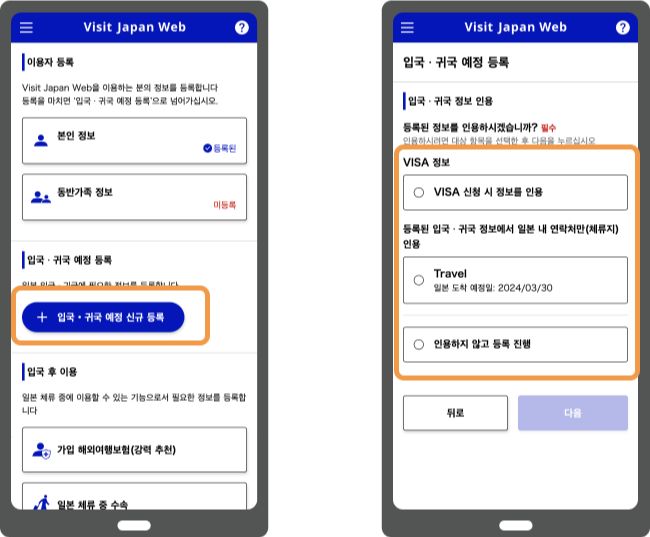
Select “Register new planned entry/return” on the home screen.
For a first trip, choose registration without copying existing information.
Existing trip information can be copied when appropriate.
Registration without copying: captured directlyKorean example from the official guide · View larger screenshot ↗
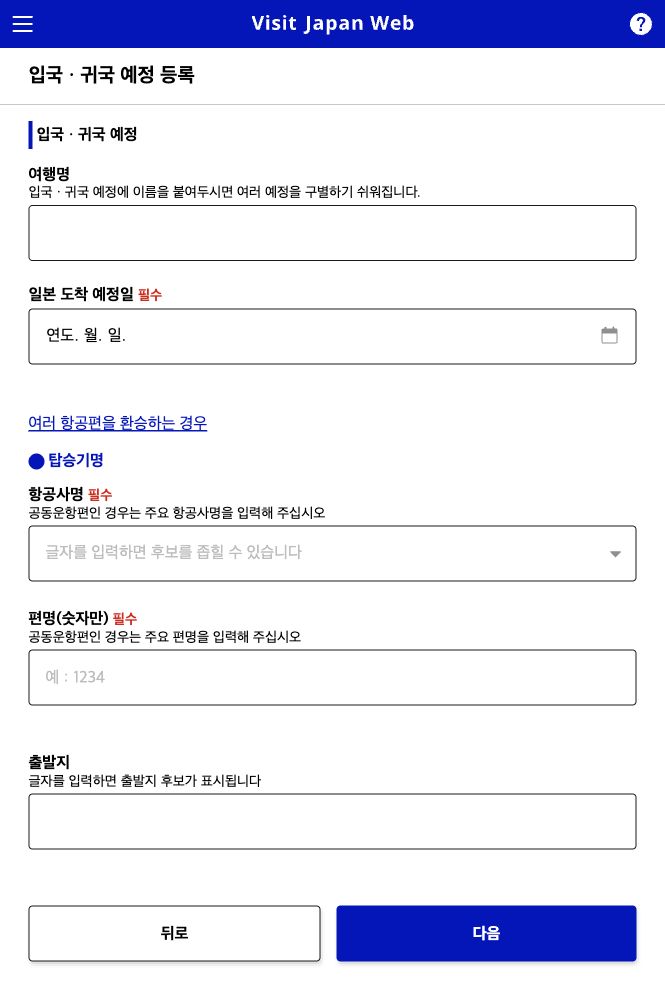
05Add your flight and accommodation+
Keep your actual booking details next to you.
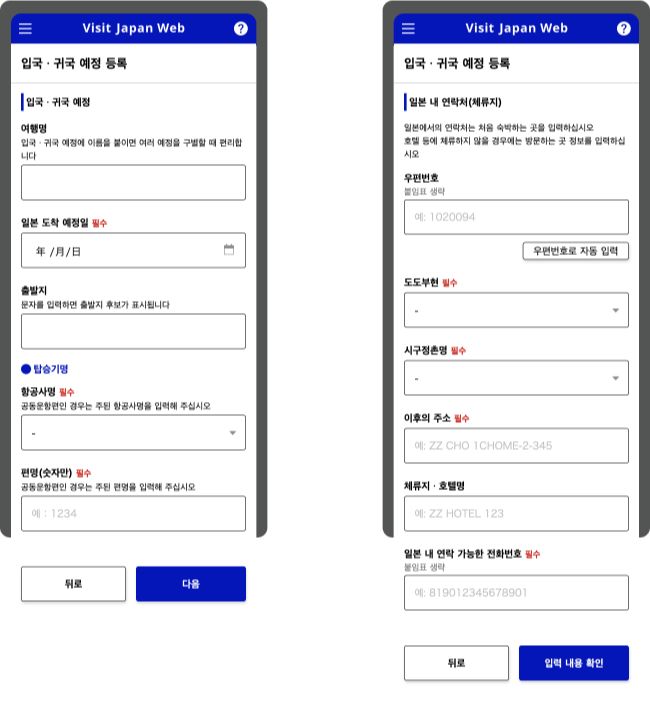
Enter the arrival date and flight information from your booking.
Enter the address, accommodation name and phone number for your stay in Japan.
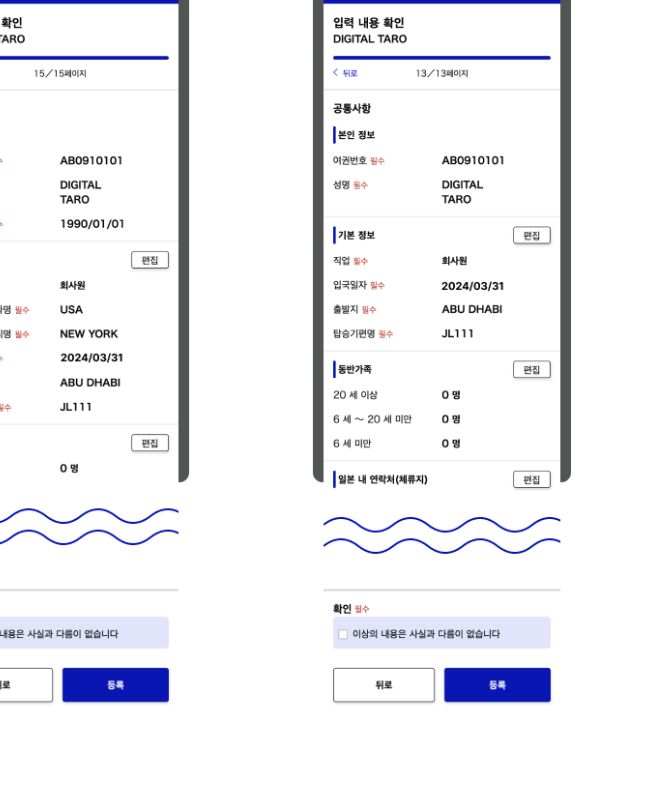
Check the details and save the trip.
Empty flight form captured directly. Accommodation fields are shown in the official example below.Korean example from the official guide · View larger screenshot ↗
06Start procedures for your trip+
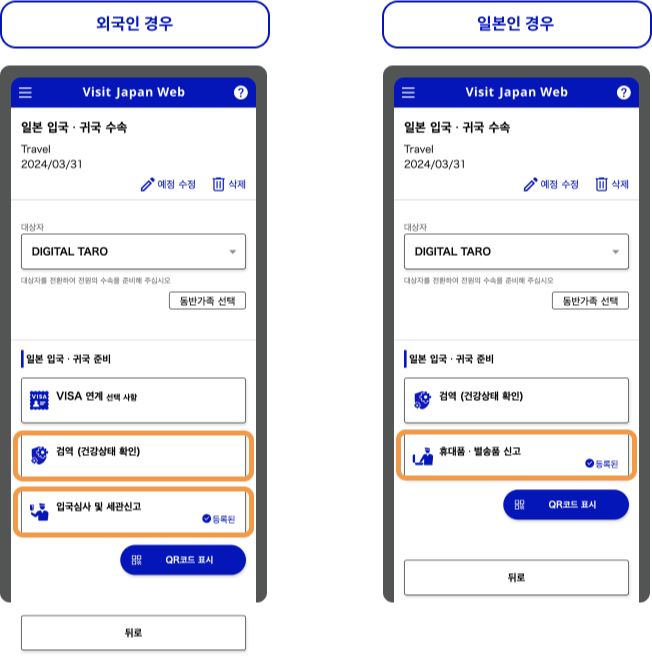
Select the arrival plan you just registered.
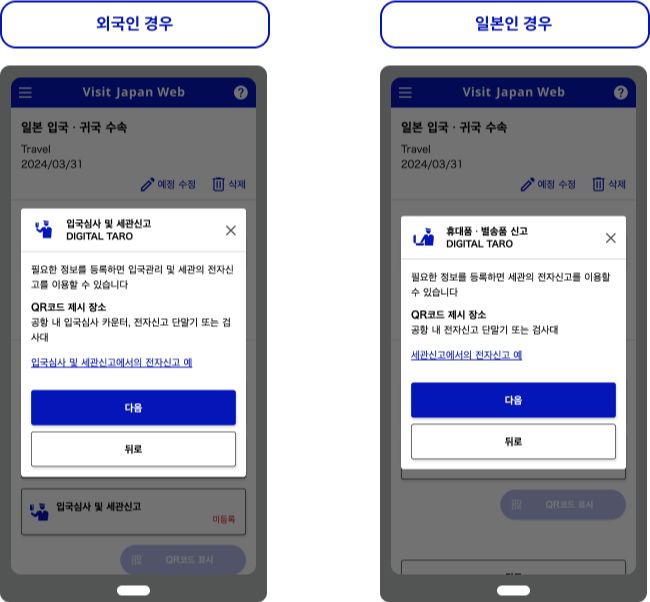
Select immigration and customs registration.
Check other displayed procedures, including quarantine/health status, as applicable.
Saving a trip is only one step. Complete immigration and customs registration for that trip as well.
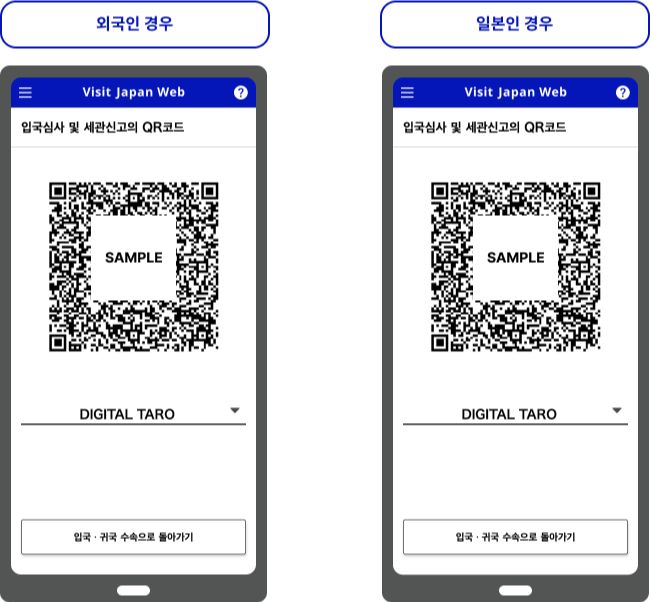
Check that the displayed QR belongs to the correct trip and traveler.
The immigration/customs QR and the tax-free shopping QR serve different purposes. The official guide says screenshots cannot be used for the tax-free QR.
Entry paperwork done? Plan your time in Osaka
Compare admission costs for the places you want to visit, or save coupons for your shopping stops.
Will the Osaka Amazing Pass save you money?
Choose your dates and attractions to compare the 1-day pass, 2-day pass and individual tickets.
Visit Japan Web registration, family and QR code FAQ
Is Visit Japan Web mandatory? Can I enter Japan without it?
Advance Visit Japan Web registration is optional. If you do not use it, you can complete arrival procedures with paper immigration and customs forms at the airport. Immigration clearance and customs declaration are still required; follow staff instructions.
We recommend completing it before departure once your flight and accommodation are arranged. Official guidance recommends entering information before reaching immigration. Creating an account is not enough: complete the trip’s immigration/customs registration and check the QR code.
Can I register for Visit Japan Web at Kansai Airport?
You can register on the official web service with an internet connection. Completing it before departure reduces what you need to enter at the airport. At KIX, follow the route for your terminal, eligibility and the instructions given on arrival.
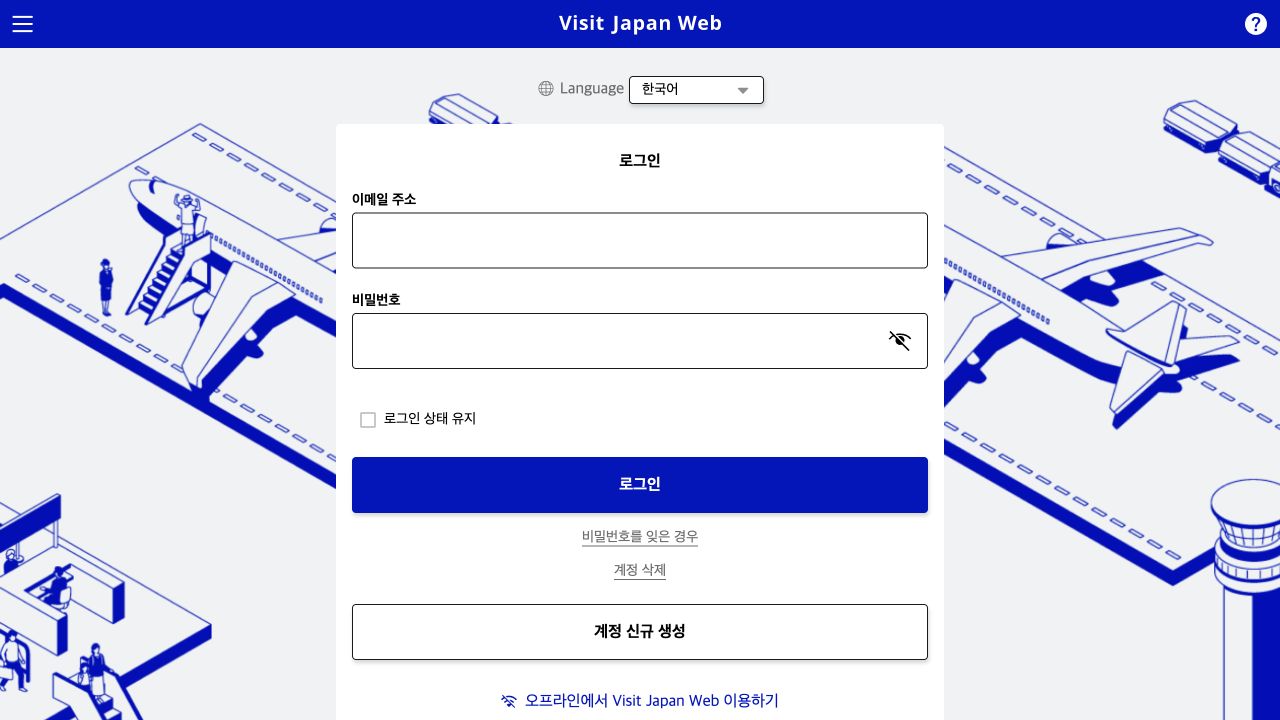
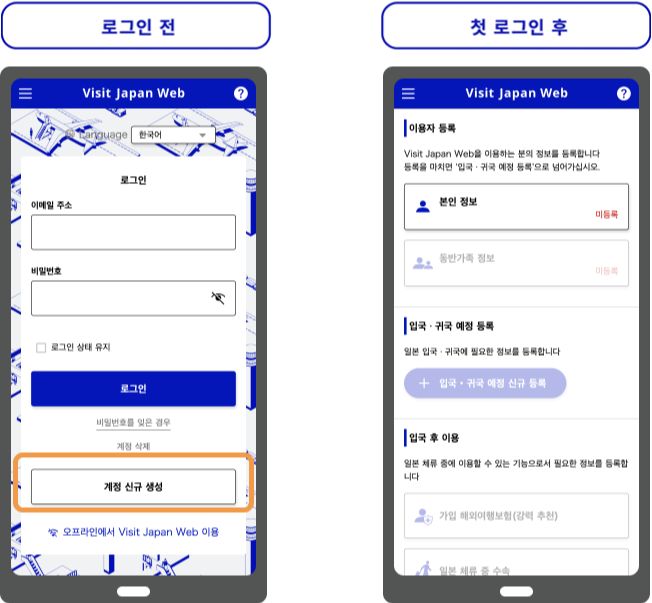
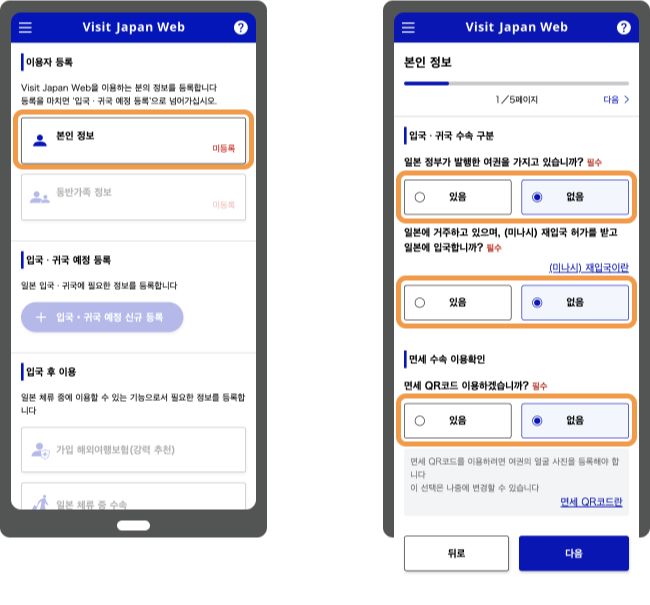
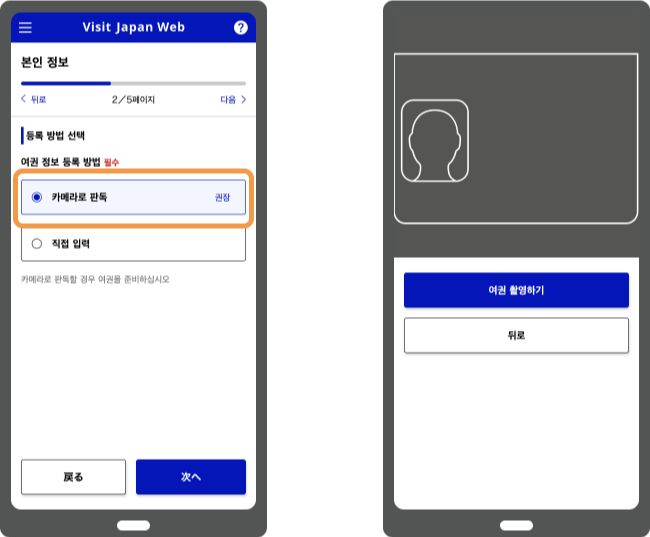
Create and verify an email account, register your details and passport, add an arrival plan with flight and hotel details, complete immigration/customs questions, review and register, then display the QR code. The registration screenshots explain each step.
Choose manual entry if scanning repeatedly fails. Check your passport number, name and date of birth against your passport. Passport scanning is required if you want to use the separate tax-free shopping QR feature.
Use your actual flight arriving in Japan, arrival date and booked accommodation’s address, name and phone number. Refer to your booking or the hotel’s official details. Do not copy a flight or address from example screenshots.
Can I register family members and children in one account?
Individual accounts are the general rule, but family members completing entry procedures together can be registered as accompanying family in the representative’s account. Enter each child’s details too, and check the immigration/customs registration and QR for every traveler.
How many QR codes do I need for immigration and customs?
The immigration and customs QR codes for foreign arrivals have been combined into one. Each traveler still needs their own QR; one code does not cover the whole family. The tax-free shopping QR is a separate feature.
Can I use a Visit Japan Web QR code screenshot at Kansai Airport?
You can prepare a screenshot of the immigration/customs QR. If you change information, display the QR again and save the updated version. The official guide says screenshots cannot be used for the separate tax-free shopping QR. Carry your physical passport too.
Check the selected arrival plan and traveler, then confirm that immigration/customs information has been completed and registered. Correct passport or flight errors in the relevant fields. If the problem continues, use the official FAQ and inquiry guidance.
How do I edit Visit Japan Web if my flight or hotel changes?
Open the relevant arrival plan, edit it and save the changes. Review and update immigration/customs information as needed, then display your current QR again. Prepare an updated code instead of continuing to use an old screenshot.
Does Visit Japan Web include the Japan arrival form and customs declaration?
For foreign travelers, immigration/customs registration includes the disembarkation record and accompanied/unaccompanied articles declaration. Saving the trip alone does not complete these forms. Answer for your actual trip and belongings, then finish arrival procedures at the airport.